For the April Fools' Day I updated our Joke Bot with new funny jokes and pranks.
I like the one in which victims are tricked into calling the zoo to ask for Mr. Lyon :)
Open April Fools' Sametime Bot
Type "april" to bot to see more joke suggestions.
Other Sametime bots:
* The original jokes bot
* Halloween jokes
* Wisdom quotes from famous people
* Translation bot
* Currency exchange rates
* Lotusphere RSS posts on Technorati
* Example of Bot processing regular expressions (regex)
* Morse code
* Random bible quote
* Get city names by zip codes (Sweden)
Here is the HTML code needed to include Joke Bot on your own web page. Access to bot is implemented with help of STWidget web client for Sametime - the first web based Sametime client.
<iframe src="http://www.stwidget.com/ggljoke/stwidget.html" scrolling="no" frameborder="0" style="width:170; height:280;"></iframe>
Example of a bot emdedded using the code above:
Tags: sametime sametime bot
Tuesday, March 31, 2009
Tuesday, March 17, 2009
Testing blogging from iPhone
Testing how it works to create a blog post using iBlogger app on iPhone. Sitting right now in a community train on the way home.
Today Apple releases news about iPhone version 3 update. I hope they will include MMS functionality, SMS forwarding and video recording. Possibility to run applications in background would also be nice, then I would consider porting STWidget Sametime web chat to a native iPhone app. The problem with current apps in iPhone is that they are automatically aborted as soon as phone goes into sleep mode. That saves of course battery life and frees up memory, but there should be a way to override this behaviour by asking user to allow to run in background. Windows PDA allow this, but I couldn't use them for more than 1.5 hours of continuous typing, iPhone lasts about 3 hours. I mean lasted 3 hours, but after version 2.2 update last month, battery life jumps up and down without obvious reason.
Today Apple releases news about iPhone version 3 update. I hope they will include MMS functionality, SMS forwarding and video recording. Possibility to run applications in background would also be nice, then I would consider porting STWidget Sametime web chat to a native iPhone app. The problem with current apps in iPhone is that they are automatically aborted as soon as phone goes into sleep mode. That saves of course battery life and frees up memory, but there should be a way to override this behaviour by asking user to allow to run in background. Windows PDA allow this, but I couldn't use them for more than 1.5 hours of continuous typing, iPhone lasts about 3 hours. I mean lasted 3 hours, but after version 2.2 update last month, battery life jumps up and down without obvious reason.
Friday, December 26, 2008
Lotusphere and USA travel authorization
I am finally ready with all my Lotusphere bookings. But as it is right now, I'll have to stay in 3 hotels. First 1 night in "Dolphin", then 4 nights in "Port Orleans Riverside" and then 1 night in "Swan". I am on the waiting list for "Port Orleans Riverside", hope that I'll get at least 1 hotel switch less.
When booking the flight ticket, I noticed a warning that from 12 January travelers must electronically register at least 72 hours prior to travel. See below for more info.
Link:
http://www.cbp.gov/linkhandler/cgov/travel/id_visa/esta/about_esta/esta_intro/esta_english.ctt/esta_english.pdf
Extract:
Effective January 12, 2009, all VWP travelers will be required to obtain an electronic travel authorization prior to boarding a carrier to travel by air or sea to the U.S. under the VWP.
VWP=Visa Waiver Program
Tag: Lotusphere
When booking the flight ticket, I noticed a warning that from 12 January travelers must electronically register at least 72 hours prior to travel. See below for more info.
Link:
http://www.cbp.gov/linkhandler/cgov/travel/id_visa/esta/about_esta/esta_intro/esta_english.ctt/esta_english.pdf
Extract:
Effective January 12, 2009, all VWP travelers will be required to obtain an electronic travel authorization prior to boarding a carrier to travel by air or sea to the U.S. under the VWP.
VWP=Visa Waiver Program
Tag: Lotusphere
Monday, December 01, 2008
Strange behavior of DXL import
While working with DXL123 freeware Domino app(beta released soon), I found a strange behavior of DXL importer in LotusScript: swedish letters (åäö) in imported stream are changed to garbled characters. But simple stream.ReadText before importing the stream fixes the problem.
I guess it has to do with wrong encoding, maybe with utf-16 being used instead of utf-8, but I don't see how I would change that or why it begins working after stream.ReadText <?xml version="1.0" encoding="utf-16"?>
Dim tmpstream As NotesStream
Dim importer As NotesDXLImporter
Dim fixencoding As String
Set tmpstream = session.CreateStream
Call domParser.setOutput(tmpstream)
Call domParser.Serialize
fixencoding=tmpstream.ReadText 'This makes the result OK
Set importer = session.CreateDXLImporter(tmpstream, sourcedoc.ParentDatabase)
importer.ReplaceDBProperties = False
importer.ReplicaRequiredForReplaceOrUpdate = False
importer.DocumentImportOption = DXLIMPORTOPTION_REPLACE_ELSE_IGNORE
Call importer.Process '.Import gives same result
DXL123 is a set of LotusScript API to easily perform different operations on inline images and on attachments without knowing anything about DXL.
Function available in DXL123:
Copy attachments between documents (without detaching to disk)
Convert inline image to attachment (without detaching to disk)
Change name of an attachment (without detaching to disk)
Remove inline images
Import disk file as an inline image
Place inline image in text after specified word/phrase
Place inline image inside a table
Replace inline picture to another picture
Replace attachment in richtext to URL link
Replace inline image to HTML image reference
Example:
attachment_name=CopyInlineImageToDocAttachment(sourcedoc, targetdoc, "Body", 2, False, True)' make the second image in Body field to become an attachment and delete the original image
Tag: dxl
I guess it has to do with wrong encoding, maybe with utf-16 being used instead of utf-8, but I don't see how I would change that or why it begins working after stream.ReadText <?xml version="1.0" encoding="utf-16"?>
Dim tmpstream As NotesStream
Dim importer As NotesDXLImporter
Dim fixencoding As String
Set tmpstream = session.CreateStream
Call domParser.setOutput(tmpstream)
Call domParser.Serialize
fixencoding=tmpstream.ReadText 'This makes the result OK
Set importer = session.CreateDXLImporter(tmpstream, sourcedoc.ParentDatabase)
importer.ReplaceDBProperties = False
importer.ReplicaRequiredForReplaceOrUpdate = False
importer.DocumentImportOption = DXLIMPORTOPTION_REPLACE_ELSE_IGNORE
Call importer.Process '.Import gives same result
DXL123 is a set of LotusScript API to easily perform different operations on inline images and on attachments without knowing anything about DXL.
Function available in DXL123:
Copy attachments between documents (without detaching to disk)
Convert inline image to attachment (without detaching to disk)
Change name of an attachment (without detaching to disk)
Remove inline images
Import disk file as an inline image
Place inline image in text after specified word/phrase
Place inline image inside a table
Replace inline picture to another picture
Replace attachment in richtext to URL link
Replace inline image to HTML image reference
Example:
attachment_name=CopyInlineImageToDocAttachment(sourcedoc, targetdoc, "Body", 2, False, True)' make the second image in Body field to become an attachment and delete the original image
Tag: dxl
Friday, October 31, 2008
Halloween bot
On this dark October evening, amuse yourself with Halloween Sametime Bot, which knows a lot of Halloween jokes about vampires, ghosts and other scary creatures:
Halloween Sametime bot
To see more scary jokes, type "scary" or "joke" to the bot.

Tags: sametime sametime bot
Halloween Sametime bot
To see more scary jokes, type "scary" or "joke" to the bot.
Tags: sametime sametime bot
Thursday, August 21, 2008
Sametime bot shows currency exchange rates
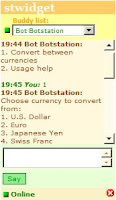
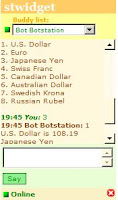
Based on Translation Bot, I created another multi-step function for our Sametime bot. It shows current exchange rates between different currencies (from Yahoo Finance).
You can try it here:
Currency Exchange Sametime bot
Instructions:
1) Type 1 and click "Say" button (or press Enter key).
2) Type 2 to set Euro as source currency and press Enter key.
3) Type 7 to set Swedish crown as target currency and press Enter key.
The result is the current exchange rate according to Yahoo finance.
Tags: sametime sametime bot
You can try it here:
Currency Exchange Sametime bot
Instructions:
1) Type 1 and click "Say" button (or press Enter key).
2) Type 2 to set Euro as source currency and press Enter key.
3) Type 7 to set Swedish crown as target currency and press Enter key.
The result is the current exchange rate according to Yahoo finance.


Tags: sametime sametime bot
Sunday, August 17, 2008
Another Javascript feature
Javascript uses pointers when assigning objects. This can lead to unexpected results for those who are used to work with LotusScript and Visual Basic, where data is copied to the new object and is no longer connected to the original object.
In the example below note that date2 object was not deliberately changed after it was initially set, but still at the end of the script it gets a new value which is the same as the changed date1 object.
<script>
var date1=new Date();
var date2=date1;
alert(date2); //shows Sun Aug 17 11:46:50 UTC+0200 2008
date1.setMonth(5);
date1.setDate(9);
alert(date2); //shows Mon Jun 9 11:46:50 UTC+0200 2008
</script>
run example
It also works in the opposite direction: if you change date2, the date1 will also be changed.
In the example below note that date2 object was not deliberately changed after it was initially set, but still at the end of the script it gets a new value which is the same as the changed date1 object.
<script>
var date1=new Date();
var date2=date1;
alert(date2); //shows Sun Aug 17 11:46:50 UTC+0200 2008
date1.setMonth(5);
date1.setDate(9);
alert(date2); //shows Mon Jun 9 11:46:50 UTC+0200 2008
</script>
run example
It also works in the opposite direction: if you change date2, the date1 will also be changed.
Monday, August 04, 2008
Why javascript doesn't like August and September in date validation
Do you like August and September months? Well, then bad news, because JavaScript doesn't like them. Using parseInt function without base parameter to convert from text to number when validating month number 08 gives 0.
This is true only for August(month "08") and September(month "09"), so it can take a while until the error is discovered. Why is that happening? Well, probably because genious developers of Javascript API thought that people use octal (base8) as default. Numbers until 08(August, put as "08" in dates) are converted correctly because they are same in octal as in base10, and numbers after 09 are recognized correctly because they(almost never) have a non-zero leading number. In between we have our poor "08" and "09".
Fortunately, there is a parameter you can add to parseInt function which specifies the base, e.g. parseInt("09", 10). But was it really so smart to use base8 as default for numbers beginning with 0 instead of always using base10 and requiring user to explicitely enter parameter for other (less used) bases?
Alternatives for parseInt are parseFloat and Number functions:
Doesn't work correctly:
javascript:alert(parseInt("09"))
Works correctly:
javascript:alert(parseInt("09", 10))
javascript:alert(Number("09"))
javascript:alert(parseFloat("09"))
This is true only for August(month "08") and September(month "09"), so it can take a while until the error is discovered. Why is that happening? Well, probably because genious developers of Javascript API thought that people use octal (base8) as default. Numbers until 08(August, put as "08" in dates) are converted correctly because they are same in octal as in base10, and numbers after 09 are recognized correctly because they(almost never) have a non-zero leading number. In between we have our poor "08" and "09".
Fortunately, there is a parameter you can add to parseInt function which specifies the base, e.g. parseInt("09", 10). But was it really so smart to use base8 as default for numbers beginning with 0 instead of always using base10 and requiring user to explicitely enter parameter for other (less used) bases?
Alternatives for parseInt are parseFloat and Number functions:
Doesn't work correctly:
javascript:alert(parseInt("09"))
Works correctly:
javascript:alert(parseInt("09", 10))
javascript:alert(Number("09"))
javascript:alert(parseFloat("09"))
Monday, July 28, 2008
Sametime bot for text translations
As I wrote in my previous blog post "LotusScript to translate text between languages", I have created a function in Sametime bot to translate text between languages using Google Translate. Now this bot functionality is available for everyone to test through STWidget-Sametime AJAX web client.
Link to live demo: Sametime translation bot
Quick instructions:
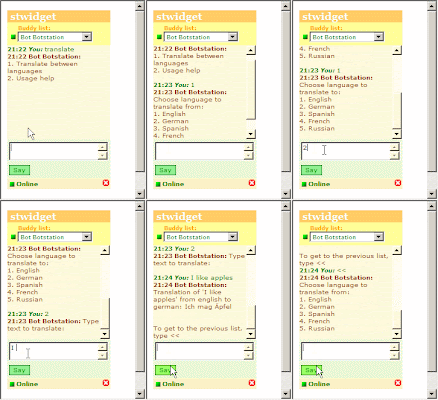
1) type 1 (to choose "Translate between languages" option) and then press Enter or click "Say" button.
2) type 1 (to choose English language) and then press Enter.
3) then type 2 (to choose German language) and Enter.
4) then type text you want to get translated, e.g. "I love programming" and Enter.
To fetch the translation result, Bot makes a web call to Google Translate service, using MSXML2 object in a slightly modified LotusScript code as in the old post. Here is an animated picture of the translation process:
Click picture to see animation
Some other funny functions available through the same bot are "joke", "wisdom", "morse" and "random bible quote". The main difference between these small functions and Translation function is that Translation works in multi-step mode, prompting user with available choices, thus eliminating the need for user to remember the syntax of the commands. Another multi-step function is "Company info" where user can get virtually any corporate info through Sametime bot.
All of the example functions above are handled by the same bot instance, so users do not need to add a separate bot to their buddy list for each new function added by developer/admin to bot.
In one of my next posts I will show a screencapture video how to develop a "whois username" function using @Formula language and how to create multi-step "Translation" function.
Tags: sametime sametime bot
Link to live demo: Sametime translation bot
Quick instructions:
1) type 1 (to choose "Translate between languages" option) and then press Enter or click "Say" button.
2) type 1 (to choose English language) and then press Enter.
3) then type 2 (to choose German language) and Enter.
4) then type text you want to get translated, e.g. "I love programming" and Enter.
To fetch the translation result, Bot makes a web call to Google Translate service, using MSXML2 object in a slightly modified LotusScript code as in the old post. Here is an animated picture of the translation process:

Click picture to see animation
Some other funny functions available through the same bot are "joke", "wisdom", "morse" and "random bible quote". The main difference between these small functions and Translation function is that Translation works in multi-step mode, prompting user with available choices, thus eliminating the need for user to remember the syntax of the commands. Another multi-step function is "Company info" where user can get virtually any corporate info through Sametime bot.
All of the example functions above are handled by the same bot instance, so users do not need to add a separate bot to their buddy list for each new function added by developer/admin to bot.
In one of my next posts I will show a screencapture video how to develop a "whois username" function using @Formula language and how to create multi-step "Translation" function.
Tags: sametime sametime bot
Wednesday, July 23, 2008
Automated login to Domino by HTTP POST request
In a comment to Joachim Dagerot's blog post "Login in with just url-arguments" I mentioned that it's possible to login without exposing login credentials in the URL. It is done by making a POST request to Domino web server, instead of GET request. User still can see login credentials if he views page's HTML source, but they are at least not shown directly in the URL. Showing login details in URL makes it possible for bypassers to see your password, it's saved in the browser's URL history and it's also logged in the Domino log database, which is not so good as anyone with access to the log database can see them. Such URL might even get indexed by Google and show up in the search results.
To additionally secure automated login, an extra redirect can be used, so the page itself does not contain the password. Or even better and without any password exposure is a page/form which calls an agent which makes login in background and then passes the session cookie back to the initial page. But that's a topic for another blog post. Here i will show the simplest solution.
<form action="/names.nsf?Login" method="POST" name="LogonForm">
<input type="hidden" name="Username" value="myname">
<input type="hidden" name="Password" value="mypassword">
<input type="hidden" name="RedirectTo" value="/anotherdb.nsf/view?OpenView">
</form>
<script>
document.forms[0].submit();
</script>

When user opens this page, the first form gets automatically submitted to "/names.nsf?Login". User gets logged in to Domino with username and password specified in the form's fields and then redirected to another database according to the value in RedirectTo field.
Tags: Lotus Domino
To additionally secure automated login, an extra redirect can be used, so the page itself does not contain the password. Or even better and without any password exposure is a page/form which calls an agent which makes login in background and then passes the session cookie back to the initial page. But that's a topic for another blog post. Here i will show the simplest solution.
<form action="/names.nsf?Login" method="POST" name="LogonForm">
<input type="hidden" name="Username" value="myname">
<input type="hidden" name="Password" value="mypassword">
<input type="hidden" name="RedirectTo" value="/anotherdb.nsf/view?OpenView">
</form>
<script>
document.forms[0].submit();
</script>

When user opens this page, the first form gets automatically submitted to "/names.nsf?Login". User gets logged in to Domino with username and password specified in the form's fields and then redirected to another database according to the value in RedirectTo field.
Tags: Lotus Domino
Sunday, June 01, 2008
LotusScript's List bug strikes again
Last week i was working with a LotusScript agent which uses List data type for storing text values. The agent was not working properly as it could not find matching values in the second list(which was populated with the same listtags as the first list). I suspected it was something wrong with processing of List, but couldn't find what part of the code was wrong, as I got no error messages. The List was more than 1000 elements and in the debugger I could only see about 200 first elements, which was not very helpful. I have earlier experienced similar problem with IsNull(mylist("listtag")) function, but in this agent there were no such IsNull checks (use IsElement instead of IsNull). After 2 hours of commenting parts of the code out, I finally found what was wrong. The fact of calling tst procedure with nonexistant list value mylist("b") as parameter, creates "b" list element with value ""! It does not generate "List item does not exist" error message as one would expect!
I have hard to think that it works "as designed", as a programmer clearly doesn't want to create a new list element by simply passing it to a procedure.
Using IsElement(mylist("b")) before calling the procedure/function helps to avoid the problem, but that shouldn't be necessary, as the programmer expects an error if the List element does not exist.
Sub Initialize
Dim mylist List As String
mylist("a")="a"
' Msgbox mylist("b") 'properly results in error "List item does not exist"
Call tst(mylist("b")) 'erroneously creates "b" list element
' Msgbox Isnull(mylist("b")) 'erroneously creates "b" list element
Msgbox mylist("b") 'shows "" as list value for "b" instead of an error
End Sub
Sub tst(tmp)
End Sub
Tags: LotusScript
I have hard to think that it works "as designed", as a programmer clearly doesn't want to create a new list element by simply passing it to a procedure.
Using IsElement(mylist("b")) before calling the procedure/function helps to avoid the problem, but that shouldn't be necessary, as the programmer expects an error if the List element does not exist.
Sub Initialize
Dim mylist List As String
mylist("a")="a"
' Msgbox mylist("b") 'properly results in error "List item does not exist"
Call tst(mylist("b")) 'erroneously creates "b" list element
' Msgbox Isnull(mylist("b")) 'erroneously creates "b" list element
Msgbox mylist("b") 'shows "" as list value for "b" instead of an error
End Sub
Sub tst(tmp)
End Sub
Tags: LotusScript
Sunday, March 02, 2008
Short tip: connect to remote Windows desktop console session
Just a short tip which I discovered today.
When connecting to a remote Windows server using the standard "Remote Desktop" client program, you are connected to a user session and can not see what happens on the server's main console (the one which you get when you login physically on the server). You can not, for example, see the Domino server console.
But there is a special parameter which can be used with Remote Desktop client to login into Windows console session instead of user session.
In Start/Run menu type:
mstsc /console
use your regular username and password, and you will be logged in directly to Windows console. I guess that you must have some kind of admin privilegies to do that.
When connecting to a remote Windows server using the standard "Remote Desktop" client program, you are connected to a user session and can not see what happens on the server's main console (the one which you get when you login physically on the server). You can not, for example, see the Domino server console.
But there is a special parameter which can be used with Remote Desktop client to login into Windows console session instead of user session.
In Start/Run menu type:
mstsc /console
use your regular username and password, and you will be logged in directly to Windows console. I guess that you must have some kind of admin privilegies to do that.
Saturday, February 23, 2008
LotusScript to translate text between languages
I am currently working to update our Sametime Bot with a new feature: translation of text. It will be a prompted flow where user is asked for input language, output language and text. The answer from the bot is the translated text. The translation is done by using a LotusScript agent which gets the translation from Google Translate page. LotusScript agent uses MSXML object for web communication with the Goggle server.
See below for an example of translation between English and German.
Pictures show the messagebox for German, Spanish, French and Russian translations. The translation is of course not perfect, but enough good to understand the general meaning.
The best automated translator I've seen so far is by the company "Prompt": http://www.e-promt.com/ It produces very correct translations and even sees the difference between "hello all Domino developers" and "hello to all Domino developers".


Tags: LotusScript
See below for an example of translation between English and German.
Pictures show the messagebox for German, Spanish, French and Russian translations. The translation is of course not perfect, but enough good to understand the general meaning.
The best automated translator I've seen so far is by the company "Prompt": http://www.e-promt.com/ It produces very correct translations and even sees the difference between "hello all Domino developers" and "hello to all Domino developers".
Sub Initialize
 Dim xmlhttp, MySoap
 Dim StartTag As String,EndTag As String, FromLang As String, ToLang As String, TextToTranslate As String
 StartTag= |<div id=result_box dir="ltr">|
 EndTag = "</div>"
 FromLang="en"
 ToLang="de"
 TextToTranslate="hello all Domino developers"
 TextToTranslate=Replace(TextToTranslate," ","%20")

 WebServer="http://translate.google.com/translate_t?text="+TextToTranslate+"&hl=en&langpair="+FromLang+"|"+ToLang+"&ie=utf-8"
 Set xmlhttp = CreateObject("MSXML2.ServerXMLHTTP")
 Call xmlhttp.open("GET", WebServer, False)
 Call xmlhttp.setRequestHeader("Content-Type", "text/html; charset=utf-8")
 Call xmlhttp.setRequestHeader("User-Agent","Mozilla/4.0 (compatible; MSIE 6.0; Windows NT 5.1)")
 Call xmlhttp.setRequestHeader("Accept","image/gif, image/x-xbitmap, image/jpeg, image/pjpeg, */*")
 Call xmlhttp.setRequestHeader("Accept-Language","sv")
 Call xmlhttp.setRequestHeader("Content-Type","application/x-www-form-urlencoded")
 Call xmlhttp.send(Null)

 strxml = xmlhttp.responseText

 Msgbox Strleft(Strright(strxml,StartTag),EndTag)

End Sub
Tags: LotusScript
Sunday, February 03, 2008
Sametime bot to read Lotusphere RSS feeds is updated
Hey folks! I am back from the long period of not blogging! And several more posts are in the pipeline, including DXL API for handling pictures/files, webcam API for spying on Notes users and Java agent to impersonate web users! :)
Last week I've updated my Sametime bot which shows blog posts in Lotusphere2007 category(on Technorati). Now it shows the last 20 posts for keyword Lotusphere2008.
You can try it here: Sametime bot
If you want to see another blog category available through STWidget and Sametime Bot, drop me a line and I'll create a new function and an appropriate STWidget link. Or do you have an idea for a cool Bot function not related to RSS? Drop me a line and I'll see what I can do :)
For sample of LotusScript agent fetching the RSS data from Technorati, see the old post: Sametime bot shows latest Lotusphere2007 blogs
Tags: Lotusphere2008 sametime sametime bot
Last week I've updated my Sametime bot which shows blog posts in Lotusphere2007 category(on Technorati). Now it shows the last 20 posts for keyword Lotusphere2008.
You can try it here: Sametime bot
If you want to see another blog category available through STWidget and Sametime Bot, drop me a line and I'll create a new function and an appropriate STWidget link. Or do you have an idea for a cool Bot function not related to RSS? Drop me a line and I'll see what I can do :)
For sample of LotusScript agent fetching the RSS data from Technorati, see the old post: Sametime bot shows latest Lotusphere2007 blogs
Tags: Lotusphere2008 sametime sametime bot
Thursday, October 11, 2007
Using regex for matching multiple words anywhere in the sentence
This blog post is to save time for those developers who want to use Regular Expressions to determine whether ALL of the multiple words are located anywhere in the input string. It took me several hours to make it work right for 3 sets with 3 alternative words in each set. Google was not to much help, only a couple of pages contained useful examples.
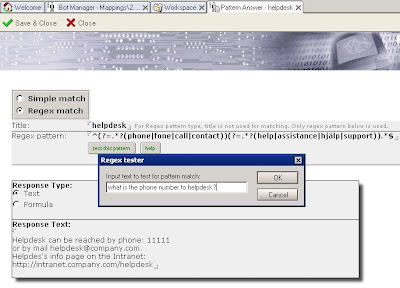
It began with me implementing regex (regular expressions) matching mechanism for our Sametime Bot to make a more flexible pattern-matching solution than current wildcard matching. So that instead of simply specifying *helpdesk* to match all incoming questions where word "helpdesk" is present, with regex it is possible to fine-tune the match and handle "what is phone number to helpdesk?" incoming question and "How can I contact helpdesk on weekends" question differently. Matching capabilities of regex are amazing, there are very little operations you can't do with it.
Pattern "any one word is enough":
helpdesk|assistance|support
Matches for: Can I get some assistance? How can I contact support? Does helpdesk have an email address?
Not matches for: What's the time? Can you assist me?
-------------------------------------
Pattern "all words must be present":
^(?=.*?(phone|fone|call|contact))(?=.*?(help|assistance|support)).*$
Matches for: What is the phone number to helpdesk? Can I call to support department from my cell phone? How can I contact helpdesk?
Not matches for: I need help! I want to call my mom. My phone doesn't work. Charlie, Charlie, this is Bravo, send more air support!
-------------------------------------
Pattern "all words must be present, but NOT that one":
^(?=.*?(phone|fone|call|contact))(?=.*?(help|assistance|support))((?!weekend|night).)*$
Matches for: I want to come in contact with support now. I need phone assistance to install ABC software today.
Not matches for: What number can i call on weekends to get help with this tool? What phone number can I call to contact helpdesk at night?
-------------------------------------
With a little help from blog post on lekkimworld, I created this LotusScript testing module so the creator of the pattern can test the pattern functionality by providing a text string which is matched to the pre-defined regex expression. The result of the test is either Match or Not match.
Sub Click(Source As Button)
Dim workspace As New NotesUIWorkspace
Dim uidoc As NotesUIDocument
Dim doc As NotesDocument
Set uidoc = workspace.CurrentDocument
Set doc=uidoc.Document
Dim regexp As Variant
Dim result As Integer
Set regexp = CreateObject("VBScript.RegExp")
regexp.IgnoreCase = True
uinput=Inputbox("Input text to test for pattern match:", "Regex tester", userinput)
userinput=uinput
regexp.Pattern = doc.RegmatchSubject(0)
result= regexp.Test(userinput)
If result = -1 Then
Msgbox "Regex match found!"
Else
Msgbox "Regex match NOT found!"
End If
Set regexp=Nothing
End Sub
Online demo of regex questions to Bot: http://www.botstation.com/sametime/bot_regex.html
Tags: Sametime bot regex
It began with me implementing regex (regular expressions) matching mechanism for our Sametime Bot to make a more flexible pattern-matching solution than current wildcard matching. So that instead of simply specifying *helpdesk* to match all incoming questions where word "helpdesk" is present, with regex it is possible to fine-tune the match and handle "what is phone number to helpdesk?" incoming question and "How can I contact helpdesk on weekends" question differently. Matching capabilities of regex are amazing, there are very little operations you can't do with it.
Pattern "any one word is enough":
helpdesk|assistance|support
Matches for: Can I get some assistance? How can I contact support? Does helpdesk have an email address?
Not matches for: What's the time? Can you assist me?
-------------------------------------
Pattern "all words must be present":
^(?=.*?(phone|fone|call|contact))(?=.*?(help|assistance|support)).*$
Matches for: What is the phone number to helpdesk? Can I call to support department from my cell phone? How can I contact helpdesk?
Not matches for: I need help! I want to call my mom. My phone doesn't work. Charlie, Charlie, this is Bravo, send more air support!
-------------------------------------
Pattern "all words must be present, but NOT that one":
^(?=.*?(phone|fone|call|contact))(?=.*?(help|assistance|support))((?!weekend|night).)*$
Matches for: I want to come in contact with support now. I need phone assistance to install ABC software today.
Not matches for: What number can i call on weekends to get help with this tool? What phone number can I call to contact helpdesk at night?
-------------------------------------
With a little help from blog post on lekkimworld, I created this LotusScript testing module so the creator of the pattern can test the pattern functionality by providing a text string which is matched to the pre-defined regex expression. The result of the test is either Match or Not match.
Sub Click(Source As Button)
Dim workspace As New NotesUIWorkspace
Dim uidoc As NotesUIDocument
Dim doc As NotesDocument
Set uidoc = workspace.CurrentDocument
Set doc=uidoc.Document
Dim regexp As Variant
Dim result As Integer
Set regexp = CreateObject("VBScript.RegExp")
regexp.IgnoreCase = True
uinput=Inputbox("Input text to test for pattern match:", "Regex tester", userinput)
userinput=uinput
regexp.Pattern = doc.RegmatchSubject(0)
result= regexp.Test(userinput)
If result = -1 Then
Msgbox "Regex match found!"
Else
Msgbox "Regex match NOT found!"
End If
Set regexp=Nothing
End Sub
Online demo of regex questions to Bot: http://www.botstation.com/sametime/bot_regex.html

Tags: Sametime bot regex
Wednesday, September 12, 2007
Morse code in @Formula language and as a function in Sametime Bot
Here comes another post about using Lotus Notes' @Formula programming language for accomplishing different tasks. This time I'll show how to convert text to Morse code. Morse code is a method for transmitting telegraphic information, using standardized sequences of short and long elements to represent the letters, numerals, punctuation and special characters of a message.


The @Formula code is rather short. First we by specify 2 arrays: one with letters and another with corresponding morse code. Then we simply use @ReplaceSubstring function to replace the letters in the input text to corresponding elements in the morse array. As the number of elements in the 2 arrays are the same, @ReplaceSubstring function applies 1-to-1 element replacement.
letters:=" ":"A":"B":"C":"D":"E":"F":"G":"H":"I":"J":"K":"L":"M":"N":"O":"P":"Q":"R":"S":"T":"U":"V":"W":"X":"Y":"Z":"1":"2":"3":"4":"5":"6":"7":"8":"9":"0";
morse:=" ":".-":"-...":"-.-.":"-..":".":"..-.":"--.":"....":"..":".---":"-.-":".-..":"--":"-.":"---":".--.":"--.-":".-.":"...":"-":"..-":"...-":".--":"-..-":"-.--":"--..":".----":"..---":"...--":"....-":".....":"-....":"--...":"---..":"----.":"-----";
plaintext:="Morse code";
encoded:=@ReplaceSubstring(@UpperCase(plaintext);letters;morse+" ");
encoded
To reverse the process and convert from morse code to plain text following code can be used:
letters:="A":"B":"C":"D":"E":"F":"G":"H":"I":"J":"K":"L":"M":"N":"O":"P":"Q":"R":"S":"T":"U":"V":"W":"X":"Y":"Z":"1":"2":"3":"4":"5":"6":"7":"8":"9":"0";
morse:=".-":"-...":"-.-.":"-..":".":"..-.":"--.":"....":"..":".---":"-.-":".-..":"--":"-.":"---":".--.":"--.-":".-.":"...":"-":"..-":"...-":".--":"-..-":"-.--":"--..":".----":"..---":"...--":"....-":".....":"-....":"--...":"---..":"----.":"-----";
encoded:="-- --- .-. ... . -.-. --- -.. . ";
plain:=@ReplaceSubstring(@Implode(@Replace(@Explode(@ReplaceSubstring(encoded;" ";" _ ");" ");morse;letters);"");"_";" ");
plain
I also implemented same morse formula as a function in Botstation Bot Framework, where user passes a text string to Sametime bot and receives the morse code as output. Here is a picture and a live example.
Bot command syntax:
morse HERE IS TEXT TO ENCODE
demorse .. .-.. --- ...- . ... .- -- . - .. -- .
Morse Bot online example: http://www.botstation.com/sametime/stwidget_morse.php

Tags: Lotus Domino Sametime
The @Formula code is rather short. First we by specify 2 arrays: one with letters and another with corresponding morse code. Then we simply use @ReplaceSubstring function to replace the letters in the input text to corresponding elements in the morse array. As the number of elements in the 2 arrays are the same, @ReplaceSubstring function applies 1-to-1 element replacement.
letters:=" ":"A":"B":"C":"D":"E":"F":"G":"H":"I":"J":"K":"L":"M":"N":"O":"P":"Q":"R":"S":"T":"U":"V":"W":"X":"Y":"Z":"1":"2":"3":"4":"5":"6":"7":"8":"9":"0";
morse:=" ":".-":"-...":"-.-.":"-..":".":"..-.":"--.":"....":"..":".---":"-.-":".-..":"--":"-.":"---":".--.":"--.-":".-.":"...":"-":"..-":"...-":".--":"-..-":"-.--":"--..":".----":"..---":"...--":"....-":".....":"-....":"--...":"---..":"----.":"-----";
plaintext:="Morse code";
encoded:=@ReplaceSubstring(@UpperCase(plaintext);letters;morse+" ");
encoded
To reverse the process and convert from morse code to plain text following code can be used:
letters:="A":"B":"C":"D":"E":"F":"G":"H":"I":"J":"K":"L":"M":"N":"O":"P":"Q":"R":"S":"T":"U":"V":"W":"X":"Y":"Z":"1":"2":"3":"4":"5":"6":"7":"8":"9":"0";
morse:=".-":"-...":"-.-.":"-..":".":"..-.":"--.":"....":"..":".---":"-.-":".-..":"--":"-.":"---":".--.":"--.-":".-.":"...":"-":"..-":"...-":".--":"-..-":"-.--":"--..":".----":"..---":"...--":"....-":".....":"-....":"--...":"---..":"----.":"-----";
encoded:="-- --- .-. ... . -.-. --- -.. . ";
plain:=@ReplaceSubstring(@Implode(@Replace(@Explode(@ReplaceSubstring(encoded;" ";" _ ");" ");morse;letters);"");"_";" ");
plain
I also implemented same morse formula as a function in Botstation Bot Framework, where user passes a text string to Sametime bot and receives the morse code as output. Here is a picture and a live example.
Bot command syntax:
morse HERE IS TEXT TO ENCODE
demorse .. .-.. --- ...- . ... .- -- . - .. -- .
Morse Bot online example: http://www.botstation.com/sametime/stwidget_morse.php

Tags: Lotus Domino Sametime
Monday, September 10, 2007
Remove HTML tags using one line of @Formula
When you need to remove HTML tags from HTML-formatted text, you can use following Domino @Formula:
@ReplaceSubstring(@ReplaceSubstring(OriginalText;"<br>":"<li>":"<ul>":"</ul>";@NewLine:@NewLine:(@NewLine+@NewLine):(@NewLine+@NewLine));"<"+@Right(@Explode(OriginalText;">");"<")+">";"")
See attached picture for example of original HTML-formatted text and of resulting text where HTML tags are stripped out.
The @Formula does following:
1) Splits the original text using "<" as separator, creating an array of strings
2) In each array element takes the text to the right of the ">" character, which gives us every HTML tag used in the original text, for example BR, B, U, LI, FONT
3) Adds "<" and ">" to the calculated tags, so the array now consists of <BR>, <B>, <U>, <LI>, <FONT> etc.
4) In the original text replaces the occurances of computed tags to empty string "", thus stripping HTML out of text.
As we often want to keep line breaks to keep the original look, then before replacing the tags with empty string, we replace <BR>, <UL>, <LI> with a hard new line. Without handling line breaks the code is much shorter:
@ReplaceSubstring(OriginalText;"<"+@Right(@Explode(OriginalText;">");"<")+">";"")

@ReplaceSubstring(@ReplaceSubstring(OriginalText;"<br>":"<li>":"<ul>":"</ul>";@NewLine:@NewLine:(@NewLine+@NewLine):(@NewLine+@NewLine));"<"+@Right(@Explode(OriginalText;">");"<")+">";"")
See attached picture for example of original HTML-formatted text and of resulting text where HTML tags are stripped out.
The @Formula does following:
1) Splits the original text using "<" as separator, creating an array of strings
2) In each array element takes the text to the right of the ">" character, which gives us every HTML tag used in the original text, for example BR, B, U, LI, FONT
3) Adds "<" and ">" to the calculated tags, so the array now consists of <BR>, <B>, <U>, <LI>, <FONT> etc.
4) In the original text replaces the occurances of computed tags to empty string "", thus stripping HTML out of text.
As we often want to keep line breaks to keep the original look, then before replacing the tags with empty string, we replace <BR>, <UL>, <LI> with a hard new line. Without handling line breaks the code is much shorter:
@ReplaceSubstring(OriginalText;"<"+@Right(@Explode(OriginalText;">");"<")+">";"")

Sunday, June 03, 2007
Prohibit users to trigger agents from web
When developing agents, it's easy to forget that every agent can be triggered from web with agentname?OpenAgent URL. Such agent invocation can cause unpredictable results.
To avoid this, developer has these 2 options:
1) Hide agent from web using property "hide design element from: Web browsers"
2) Programmatically find out if the agent is triggered from web and exit
Sub Initialize
ev=Evaluate("@ClientType")
If ev(0)="Web" Then Exit Sub 'Do not run agent if triggered from web
'here goes the rest of the code
'which will be executed in Notes client but not on web
End Sub
To avoid this, developer has these 2 options:
1) Hide agent from web using property "hide design element from: Web browsers"
2) Programmatically find out if the agent is triggered from web and exit
Sub Initialize
ev=Evaluate("@ClientType")
If ev(0)="Web" Then Exit Sub 'Do not run agent if triggered from web
'here goes the rest of the code
'which will be executed in Notes client but not on web
End Sub
Sunday, May 20, 2007
Friday, May 18, 2007
You've got a message... from the Second Life
Nicholas Chase has published an interesting article on IBM Developerworks. It's about making it possible to chat with people in Second Life (SL), without opening SL program. That's a rather innovative solution and I think that many SL users would appreciate such possibility.
It works like this:
1) SL person clicks an object (a picture, a cube) which says "Type message now and it will be send to John Doe"
2)SL person types the message, like "Hi John, can you hear me?", while being near the object.
3)The object can "see" the typed text and sends it to a web servlet using HTTP call. Web server has a connection to Sametime server through Sametime bot.
4) Sametime bot forwards the message to John Doe, who is logged in on Sametime network.
5) John Doe has his Sametime client started and receives a message from Sametime Bot, saying "Hi John, can you hear me?".
6) John Doe types "Yes, how can I help you?" as the response to bot in the Sametime client chat window.
7) Bot outputs the answer to the servlet and the servlet outputs it back to the requesting SL object.
8) The object shows message "Yes, how can I help you?" in SL. Anyone near the object can see the message. So you actually do not chat with the person, but with the object itself, which "broadcasts" your message to all people nearby. I think your response message can in theory also be a private message send only to that person, but the person's request message is always visible to others.
http://www-128.ibm.com/developerworks/edu/ls-dw-ls-stsl.html
I will try to implement the suggested solution and see if it can be used for something more useful than spam-chatting with people near chatboxes :)
Like having a "chat conference meeting" where people do not need to be logged in to SL, and actually do not even need an SL account. Can be interesting solution for chat-only SL meetings hold by companies like IBM. It should be possible to sort away chats from people other than the meeting's chairman. Just imagine an online conference where instead of people's avatars you see a lot of chatting cubes :)
I will also try to connect the solution to my company's Sametime Botand use STWidget as a chat client. Having AJAX/Flash-based STWidget web client as chat interface would eliminate the need to download and install Sametime client.
There are thousands of virtual shops in SL selling virual clothes, virtual furniture and stuff, and some shop owners would probably like to have an option to chat with customers even when they are not logged in to SL. Not sure if there is already some software for this #.
Following things are to consider when developing SL-to-Sametime chat solution for more than 1 user:
* Noone in SL knows what Sametime is and don't care much either. A Sametime-less option would be great (Apache+MySQL+PHP).
* Sametime bot must be hosted somewhere.
* Same Sametime bot should be able to handle tens of thousands of objects and hundreds of simultaneous chats. I guess our Sametime bot can be extended for this purpose, but it's still a difficult task. Probably several bots at several locations would be needed.
* People do not have Sametime client and don't want one. Can be solved with STWidget though.
* People do not have access to Sametime servers. Can be temporary solved by using IBM's demo server.
* The biggest question: will Sametime add too much overhead to the solution, without actually making it easier to develop and maintain? Theoretically a message can be sent directly to STWidget chat client without going through Sametime network.
I'll publish the results of my tests.
Tags: sametime sametime bot
It works like this:
1) SL person clicks an object (a picture, a cube) which says "Type message now and it will be send to John Doe"
2)SL person types the message, like "Hi John, can you hear me?", while being near the object.
3)The object can "see" the typed text and sends it to a web servlet using HTTP call. Web server has a connection to Sametime server through Sametime bot.
4) Sametime bot forwards the message to John Doe, who is logged in on Sametime network.
5) John Doe has his Sametime client started and receives a message from Sametime Bot, saying "Hi John, can you hear me?".
6) John Doe types "Yes, how can I help you?" as the response to bot in the Sametime client chat window.
7) Bot outputs the answer to the servlet and the servlet outputs it back to the requesting SL object.
8) The object shows message "Yes, how can I help you?" in SL. Anyone near the object can see the message. So you actually do not chat with the person, but with the object itself, which "broadcasts" your message to all people nearby. I think your response message can in theory also be a private message send only to that person, but the person's request message is always visible to others.
http://www-128.ibm.com/developerworks/edu/ls-dw-ls-stsl.html
I will try to implement the suggested solution and see if it can be used for something more useful than spam-chatting with people near chatboxes :)
Like having a "chat conference meeting" where people do not need to be logged in to SL, and actually do not even need an SL account. Can be interesting solution for chat-only SL meetings hold by companies like IBM. It should be possible to sort away chats from people other than the meeting's chairman. Just imagine an online conference where instead of people's avatars you see a lot of chatting cubes :)
I will also try to connect the solution to my company's Sametime Botand use STWidget as a chat client. Having AJAX/Flash-based STWidget web client as chat interface would eliminate the need to download and install Sametime client.
There are thousands of virtual shops in SL selling virual clothes, virtual furniture and stuff, and some shop owners would probably like to have an option to chat with customers even when they are not logged in to SL. Not sure if there is already some software for this #.
Following things are to consider when developing SL-to-Sametime chat solution for more than 1 user:
* Noone in SL knows what Sametime is and don't care much either. A Sametime-less option would be great (Apache+MySQL+PHP).
* Sametime bot must be hosted somewhere.
* Same Sametime bot should be able to handle tens of thousands of objects and hundreds of simultaneous chats. I guess our Sametime bot can be extended for this purpose, but it's still a difficult task. Probably several bots at several locations would be needed.
* People do not have Sametime client and don't want one. Can be solved with STWidget though.
* People do not have access to Sametime servers. Can be temporary solved by using IBM's demo server.
* The biggest question: will Sametime add too much overhead to the solution, without actually making it easier to develop and maintain? Theoretically a message can be sent directly to STWidget chat client without going through Sametime network.
I'll publish the results of my tests.
Tags: sametime sametime bot
Subscribe to:
Posts (Atom)