Showing posts with label Sametime bot. Show all posts

Friday, October 31, 2008

Halloween bot

On this dark October evening, amuse yourself with Halloween Sametime Bot, which knows a lot of Halloween jokes about vampires, ghosts and other scary creatures:

Halloween Sametime bot

To see more scary jokes, type "scary" or "joke" to the bot.


Tags:

Thursday, August 21, 2008

Sametime bot shows currency exchange rates

Based on Translation Bot, I created another multi-step function for our Sametime bot. It shows current exchange rates between different currencies (from Yahoo Finance).
You can try it here:
Currency Exchange Sametime bot

Instructions:
1) Type 1 and click "Say" button (or press Enter key).
2) Type 2 to set Euro as source currency and press Enter key.
3) Type 7 to set Swedish crown as target currency and press Enter key.
The result is the current exchange rate according to Yahoo finance.


Tags:

Monday, July 28, 2008

Sametime bot for text translations

As I wrote in my previous blog post "LotusScript to translate text between languages", I have created a function in Sametime bot to translate text between languages using Google Translate. Now this bot functionality is available for everyone to test through STWidget-Sametime AJAX web client.

Link to live demo: Sametime translation bot

Quick instructions:
1) type 1 (to choose "Translate between languages" option) and then press Enter or click "Say" button.
2) type 1 (to choose English language) and then press Enter.
3) then type 2 (to choose German language) and Enter.
4) then type text you want to get translated, e.g. "I love programming" and Enter.

To fetch the translation result, Bot makes a web call to Google Translate service, using MSXML2 object in a slightly modified LotusScript code as in the old post. Here is an animated picture of the translation process:

Sametime translation bot animation

Click picture to see animation


Some other funny functions available through the same bot are "joke", "wisdom", "morse" and "random bible quote". The main difference between these small functions and Translation function is that Translation works in multi-step mode, prompting user with available choices, thus eliminating the need for user to remember the syntax of the commands. Another multi-step function is "Company info" where user can get virtually any corporate info through Sametime bot.

All of the example functions above are handled by the same bot instance, so users do not need to add a separate bot to their buddy list for each new function added by developer/admin to bot.

In one of my next posts I will show a screencapture video how to develop a "whois username" function using @Formula language and how to create multi-step "Translation" function.


Tags:

Sunday, February 03, 2008

Sametime bot to read Lotusphere RSS feeds is updated

Hey folks! I am back from the long period of not blogging! And several more posts are in the pipeline, including DXL API for handling pictures/files, webcam API for spying on Notes users and Java agent to impersonate web users! :)

Last week I've updated my Sametime bot which shows blog posts in Lotusphere2007 category(on Technorati). Now it shows the last 20 posts for keyword Lotusphere2008.
You can try it here: Sametime bot

If you want to see another blog category available through STWidget and Sametime Bot, drop me a line and I'll create a new function and an appropriate STWidget link. Or do you have an idea for a cool Bot function not related to RSS? Drop me a line and I'll see what I can do :)

For sample of LotusScript agent fetching the RSS data from Technorati, see the old post: Sametime bot shows latest Lotusphere2007 blogs

Tags:

Thursday, October 11, 2007

Using regex for matching multiple words anywhere in the sentence

This blog post is to save time for those developers who want to use Regular Expressions to determine whether ALL of the multiple words are located anywhere in the input string. It took me several hours to make it work right for 3 sets with 3 alternative words in each set. Google was not to much help, only a couple of pages contained useful examples.

It began with me implementing regex (regular expressions) matching mechanism for our Sametime Bot to make a more flexible pattern-matching solution than current wildcard matching. So that instead of simply specifying *helpdesk* to match all incoming questions where word "helpdesk" is present, with regex it is possible to fine-tune the match and handle "what is phone number to helpdesk?" incoming question and "How can I contact helpdesk on weekends" question differently. Matching capabilities of regex are amazing, there are very little operations you can't do with it.

Pattern "any one word is enough":
helpdesk|assistance|support

Matches for: Can I get some assistance? How can I contact support? Does helpdesk have an email address?
Not matches for: What's the time? Can you assist me?

-------------------------------------

Pattern "all words must be present":
^(?=.*?(phone|fone|call|contact))(?=.*?(help|assistance|support)).*$

Matches for: What is the phone number to helpdesk? Can I call to support department from my cell phone? How can I contact helpdesk?
Not matches for: I need help! I want to call my mom. My phone doesn't work. Charlie, Charlie, this is Bravo, send more air support!

-------------------------------------

Pattern "all words must be present, but NOT that one":
^(?=.*?(phone|fone|call|contact))(?=.*?(help|assistance|support))((?!weekend|night).)*$

Matches for: I want to come in contact with support now. I need phone assistance to install ABC software today.
Not matches for: What number can i call on weekends to get help with this tool? What phone number can I call to contact helpdesk at night?

-------------------------------------


With a little help from blog post on lekkimworld, I created this LotusScript testing module so the creator of the pattern can test the pattern functionality by providing a text string which is matched to the pre-defined regex expression. The result of the test is either Match or Not match.

Sub Click(Source As Button)
Dim workspace As New NotesUIWorkspace
Dim uidoc As NotesUIDocument
Dim doc As NotesDocument
Set uidoc = workspace.CurrentDocument
Set doc=uidoc.Document
Dim regexp As Variant
Dim result As Integer
Set regexp = CreateObject("VBScript.RegExp")
regexp.IgnoreCase = True
uinput=Inputbox("Input text to test for pattern match:", "Regex tester", userinput)

userinput=uinput
regexp.Pattern = doc.RegmatchSubject(0)
result= regexp.Test(userinput)
If result = -1 Then
Msgbox "Regex match found!"
Else
Msgbox "Regex match NOT found!"
End If
Set regexp=Nothing
End Sub

Online demo of regex questions to Bot: http://www.botstation.com/sametime/bot_regex.html

Sametime Bot regex


Tags:

Wednesday, September 12, 2007

Morse code in @Formula language and as a function in Sametime Bot

Here comes another post about using Lotus Notes' @Formula programming language for accomplishing different tasks. This time I'll show how to convert text to Morse code. Morse code is a method for transmitting telegraphic information, using standardized sequences of short and long elements to represent the letters, numerals, punctuation and special characters of a message.


The @Formula code is rather short. First we by specify 2 arrays: one with letters and another with corresponding morse code. Then we simply use @ReplaceSubstring function to replace the letters in the input text to corresponding elements in the morse array. As the number of elements in the 2 arrays are the same, @ReplaceSubstring function applies 1-to-1 element replacement.

letters:=" ":"A":"B":"C":"D":"E":"F":"G":"H":"I":"J":"K":"L":"M":"N":"O":"P":"Q":"R":"S":"T":"U":"V":"W":"X":"Y":"Z":"1":"2":"3":"4":"5":"6":"7":"8":"9":"0";
morse:=" ":".-":"-...":"-.-.":"-..":".":"..-.":"--.":"....":"..":".---":"-.-":".-..":"--":"-.":"---":".--.":"--.-":".-.":"...":"-":"..-":"...-":".--":"-..-":"-.--":"--..":".----":"..---":"...--":"....-":".....":"-....":"--...":"---..":"----.":"-----";
plaintext:="Morse code";
encoded:=@ReplaceSubstring(@UpperCase(plaintext);letters;morse+" ");
encoded


To reverse the process and convert from morse code to plain text following code can be used:

letters:="A":"B":"C":"D":"E":"F":"G":"H":"I":"J":"K":"L":"M":"N":"O":"P":"Q":"R":"S":"T":"U":"V":"W":"X":"Y":"Z":"1":"2":"3":"4":"5":"6":"7":"8":"9":"0";
morse:=".-":"-...":"-.-.":"-..":".":"..-.":"--.":"....":"..":".---":"-.-":".-..":"--":"-.":"---":".--.":"--.-":".-.":"...":"-":"..-":"...-":".--":"-..-":"-.--":"--..":".----":"..---":"...--":"....-":".....":"-....":"--...":"---..":"----.":"-----";
encoded:="-- --- .-. ... . -.-. --- -.. . ";
plain:=@ReplaceSubstring(@Implode(@Replace(@Explode(@ReplaceSubstring(encoded;" ";" _ ");" ");morse;letters);"");"_";" ");
plain


I also implemented same morse formula as a function in Botstation Bot Framework, where user passes a text string to Sametime bot and receives the morse code as output. Here is a picture and a live example.
Bot command syntax:
morse HERE IS TEXT TO ENCODE
demorse .. .-.. --- ...- . ... .- -- . - .. -- .

Morse Bot online example: http://www.botstation.com/sametime/stwidget_morse.php


Tags:

Friday, May 18, 2007

You've got a message... from the Second Life

Nicholas Chase has published an interesting article on IBM Developerworks. It's about making it possible to chat with people in Second Life (SL), without opening SL program. That's a rather innovative solution and I think that many SL users would appreciate such possibility.

It works like this:
1) SL person clicks an object (a picture, a cube) which says "Type message now and it will be send to John Doe"
2)SL person types the message, like "Hi John, can you hear me?", while being near the object.
3)The object can "see" the typed text and sends it to a web servlet using HTTP call. Web server has a connection to Sametime server through Sametime bot.
4) Sametime bot forwards the message to John Doe, who is logged in on Sametime network.
5) John Doe has his Sametime client started and receives a message from Sametime Bot, saying "Hi John, can you hear me?".
6) John Doe types "Yes, how can I help you?" as the response to bot in the Sametime client chat window.
7) Bot outputs the answer to the servlet and the servlet outputs it back to the requesting SL object.
8) The object shows message "Yes, how can I help you?" in SL. Anyone near the object can see the message. So you actually do not chat with the person, but with the object itself, which "broadcasts" your message to all people nearby. I think your response message can in theory also be a private message send only to that person, but the person's request message is always visible to others.

http://www-128.ibm.com/developerworks/edu/ls-dw-ls-stsl.html

I will try to implement the suggested solution and see if it can be used for something more useful than spam-chatting with people near chatboxes :)
Like having a "chat conference meeting" where people do not need to be logged in to SL, and actually do not even need an SL account. Can be interesting solution for chat-only SL meetings hold by companies like IBM. It should be possible to sort away chats from people other than the meeting's chairman. Just imagine an online conference where instead of people's avatars you see a lot of chatting cubes :)

I will also try to connect the solution to my company's Sametime Botand use STWidget as a chat client. Having AJAX/Flash-based STWidget web client as chat interface would eliminate the need to download and install Sametime client.

There are thousands of virtual shops in SL selling virual clothes, virtual furniture and stuff, and some shop owners would probably like to have an option to chat with customers even when they are not logged in to SL. Not sure if there is already some software for this #.

Following things are to consider when developing SL-to-Sametime chat solution for more than 1 user:
* Noone in SL knows what Sametime is and don't care much either. A Sametime-less option would be great (Apache+MySQL+PHP).
* Sametime bot must be hosted somewhere.
* Same Sametime bot should be able to handle tens of thousands of objects and hundreds of simultaneous chats. I guess our Sametime bot can be extended for this purpose, but it's still a difficult task. Probably several bots at several locations would be needed.
* People do not have Sametime client and don't want one. Can be solved with STWidget though.
* People do not have access to Sametime servers. Can be temporary solved by using IBM's demo server.
* The biggest question: will Sametime add too much overhead to the solution, without actually making it easier to develop and maintain? Theoretically a message can be sent directly to STWidget chat client without going through Sametime network.


I'll publish the results of my tests.

Tags:

Wednesday, January 24, 2007

Sametime bot shows latest Lotusphere2007 blogs

Today I've created a new bot function which shows latest 20 blog posts tagged with "Lotusphere2007" on Technorati. Took me 20 minutes to modify it from an old example of LotusScript agent and setup STWidget, the LotusScript agent code can be improved but it works.

It works like this: you type "Lotusphere2007" (not case sensitive) to sametime bot and it responds with the 20 latest blog posts. You can click the links in the result to read the post.

Here you can try the "Lotusphere2007" bot live: http://www.botstation.com/sametime/stwidget_lotusphere.html

Or just try it embedded at the end of this post with help of Sametime Widget.

Code of the LotusScript agent which bot calls to get the results:
Function AgentMain(doc As notesdocument)
Dim param As String
param= doc.ArgValue(0)
Dim objHttp, i
Set objHttp = CreateObject("Microsoft.XMLHTTP")
url = |
http://feeds.technorati.com/feed/posts/tag/lotusphere2007|
objHttp.open "GET", url, False, "", ""
objHttp.setRequestHeader "Content-type", "application/x-www-form-urlencoded"
objHttp.send("") 'send request to web server

Set xmlDoc = CreateObject("Msxml2.DOMDocument")
xmlDoc.loadXML (objHttp.ResponseText)
Set xmlLst = xmlDoc.getElementsByTagName("item")
cnt=0
For i = 0 To xmlLst.length - 1
cnt=cnt+1
Set xmlNode = xmlLst.Item(i)
Set att=xmlnode.childnodes
Forall child In att
If child.nodename="title" Then
tmp=tmp+Cstr(i)+". "+child.text+": "
End If
If child.nodename="link" Then
tmp=tmp+|<a href="|+child.text+|" target="_blank">Link</a><br/><br/>|
End If
If cnt=20 Then i=xmlLst.length
End Forall
Next

AgentMain="Last 20 posts in category Lotusphere2007:"+"<br/>"+tmp
End Function


Tags:

Sunday, January 21, 2007

Notify database responsible person about new documents using Sametime

Imagine that you are responsible for a Domino application where users can register themselves and you want to get notified about about new registrations as soon as possible.

Screenshot of the demo application:
reg db demo

This can be done by sending an email message in WebQuerySave event or SMS message, but it has its disadvantages. Sending by email can give several minutes of delay, and receiving 20 SMS per hour can be annoying. Using Sametime messages for notification is not as disturbing as beeping SMS messages and also ensures instant delivery.

One more way to see the latest registrations is to use a Sametime bot to get a quick overview of the latest registrations without opening the database in Notes client.

Let's see how you can use tools provided by Botstation Technologies (all available as free trial) to accomplish these tasks.
1) Immediate notification when user saves his registration
2) Course administrator gets latest results by asking Sametime bot

Immediate notification
To immediately notify the responsible person about new registration, all you need to do is add a couple of code lines into your WebQuerySave agent. The code uses STAgent script library, which contains the most popular functions for working with Sametime. You can easily send a Sametime message to the specified person:
Here is an example:
Dim STAgent as New STAgent()
Call STAgent.login("stserver.company.com", "Notification Agent", "password")
Call STAgent.sendMessage("Admin Doe", "New registration: "+doc.CourseDate(0)+" / "+doc.CreatedBy(0)+" / "+doc.Subject(0))
Call STAgent.logout()

The recipient immediately gets a Sametime message showing registration details and can take an appropriate action if needed.

If you have several responsible persons and want to send the notification message only to one of them, you can send the message only to the first person whos Sametime online availability status is set to Active. You can query the online status with this code line:
onlinestatus=STAgent.getOnlineStatus("Admin Doe") 'Active, Away, Offline

You can download an evaluation version of the STAgent and try by yourself in your own agents.


Notification on demand
Instead of sending a Sametime message immediately after each registration, you can query Sametime Bot to get the new registrations since last the query time. Sametime Bot from our company Botstation Technologies is able to run ordinary LotusScript agents, which makes it possible to accomplish this task in just 5 minutes. Same solution can be re-used later in similar applications. You can also restrict access to this particular bot functionality to only certain persons.

"Access properties" screenshot:

Sametime bot security

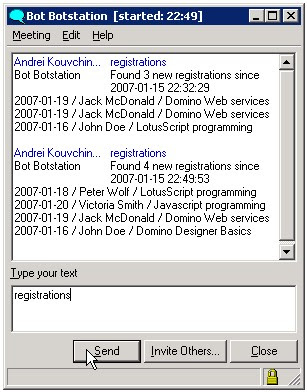
To ask bot for new registrations, you simply choose bot from your buddy list and type "registrations" to him. Bot receives your message and immediately answers with a list of last registrations.
To make this work, all you need to do is to create a LotusScript agent which searches for documents created after agent's last run time and then create a Question mapping in the bot's configuration database.
To create a bot question which triggers an agent, you specify keywords (e.g. "registrations", "bookings") and choose an agent from a list of available agents. See the picture below.

Sub Initialize
Dim s As New NotesSession
Dim agent As NotesAgent
Set agent = s.CurrentAgent
Dim db As NotesDatabase
Dim doc As NotesDocument
Set db = s.CurrentDatabase
Set doc = db.GetDocumentByID(agent.ParameterDocID)
tmp= AgentMain(doc)
doc.AgentResult=tmp
doc.savedbyagent="Yes"
Call doc.Save(True,False)
End Sub

Function AgentMain(doc As notesdocument) As String
Dim session As New NotesSession
Dim db As NotesDatabase
Dim coursedb As notesdatabase
Dim coll As NotesDocumentCollection
Dim coursedoc As NotesDocument
Dim agent As NotesAgent
Set db=doc.ParentDatabase
Set coursedb=New NotesDatabase(db.server, "coursereg.nsf")
Set agent=session.CurrentAgent
Set dateTime = New NotesDateTime(agent.LastRun )
Set col=coursedb.search(|Form="Document"|, dateTime, 0)
Set coursedoc=col.GetFirstDocument
tmp="No new registrations found since "+Cstr(agent.LastRun)
If col.count>0 Then tmp="Found "+Cstr(col.count)+" new registrations since"+Cstr(agent.LastRun)+"<br>"

While Not coursedoc Is Nothing
tmp=tmp+coursedoc.CourseDate(0)+" / "+coursedoc.CreatedBy(0)+" / "+coursedoc.CourseName(0)+"<br>"
Set coursedoc=col.GetNextDocument(coursedoc)
Wend

AgentMain=tmp
End Function


I've created a live demonstration of this functionality using the code above, you can try it here: live demo of Sametime bot reading the registration database

To emulate the real application, the bot in the demo application adds a random number of new documents (1-5) after each run. So every time you issue "registrations" command to bot, you will get some unique results.

Screenshot:
Sametime bot answers

Tags:

Friday, January 12, 2007

Sametime bot finds zip code with @DBLookup

Based on Thomas Adrian's Swedish postcodes database, I've created a function for our company's Sametime bot which returns the post codes(zip codes) for a specified city or the city name by specified zip code. All you need to implement this functionality in the free evaluation version of Botstatiuon Bot is to create a "pattern answer" with @formula which makes lookup to the database. Similar formula can be used for any database lookup from bot. Later I will add bot function to lookup for phone area codes for cities in USA and Sweden.
With Sametime Widget (STWidget) AJAX-based tool you can make a live test of the function.
Commands you can type to bot:
postcode 18200
postcode Danderyd
zip 14700
zip tumba

And of course the most popular "joke" command which shows you a random joke every time you type it :)

TRY HERE: http://www.botstation.com/products/stweb/stwidget_zip.html


-------------------------------------
city:=@ReplaceSubstring(@Trim(@Right(@RequestText;" "));" ";"-");

tmp:=@DbLookup("":"NoCache";@Subset(@DBName;1):"bot\\pnr.nsf"; "By city";city;2);
@If(@IsError(tmp); @If(@Length(city)!=5;@Return("Postnumber not found for city "+city);"");@Return("Zip code(s) for "+city+": "+@Implode(@Sort(@Unique(tmp));", ")+"<br>--------------<br>You can also try reversed command:
postnumber "+@Subset(tmp;1)));

tmp1:=@DbLookup("":"NoCache";@Subset(@DBName;1):"bot\\pnr.nsf"; "By number";city;2);
@If(@IsError(tmp1);"City for postnumber "+city+" not found"; "City for postcode "+city+": "+@Implode(tmp1;", ")+"<br>--------------<br>You can also try reversed command:<br>postnumber "+@Subset(tmp1;1))

-------------------------------------

@RequestText function above is translated by Bot into the incoming command text, for example "zip 12345".

Screenshot of Bot's answer configuration page:
Sametime bot formula

An alternative way to find zip code is to make call to a Web Service, which is also possible with Botstation Sametime Bot, I'll show how to accomplish it in some of the posts later this month.


Related posts:
Sametime bot shows a random Bible quote
Merry Christmas from Sametime Bot


Tags: